Knowledge Base · SharpFleet Job Management
Jobs that connect customers, field teams, vehicles, costs, and reporting.
SharpFleet Job Management is for teams that need more than a task list. It keeps AI-assisted requests, email intake, quotes, reminders, configurable task workflows, proofs, subcontractors, schedules, technician updates, customer portal activity, files, travel, materials, costing, reporting, billing, invoicing, and accounting handoff connected to the operational record.
Product Views
What Job Management looks like in practice
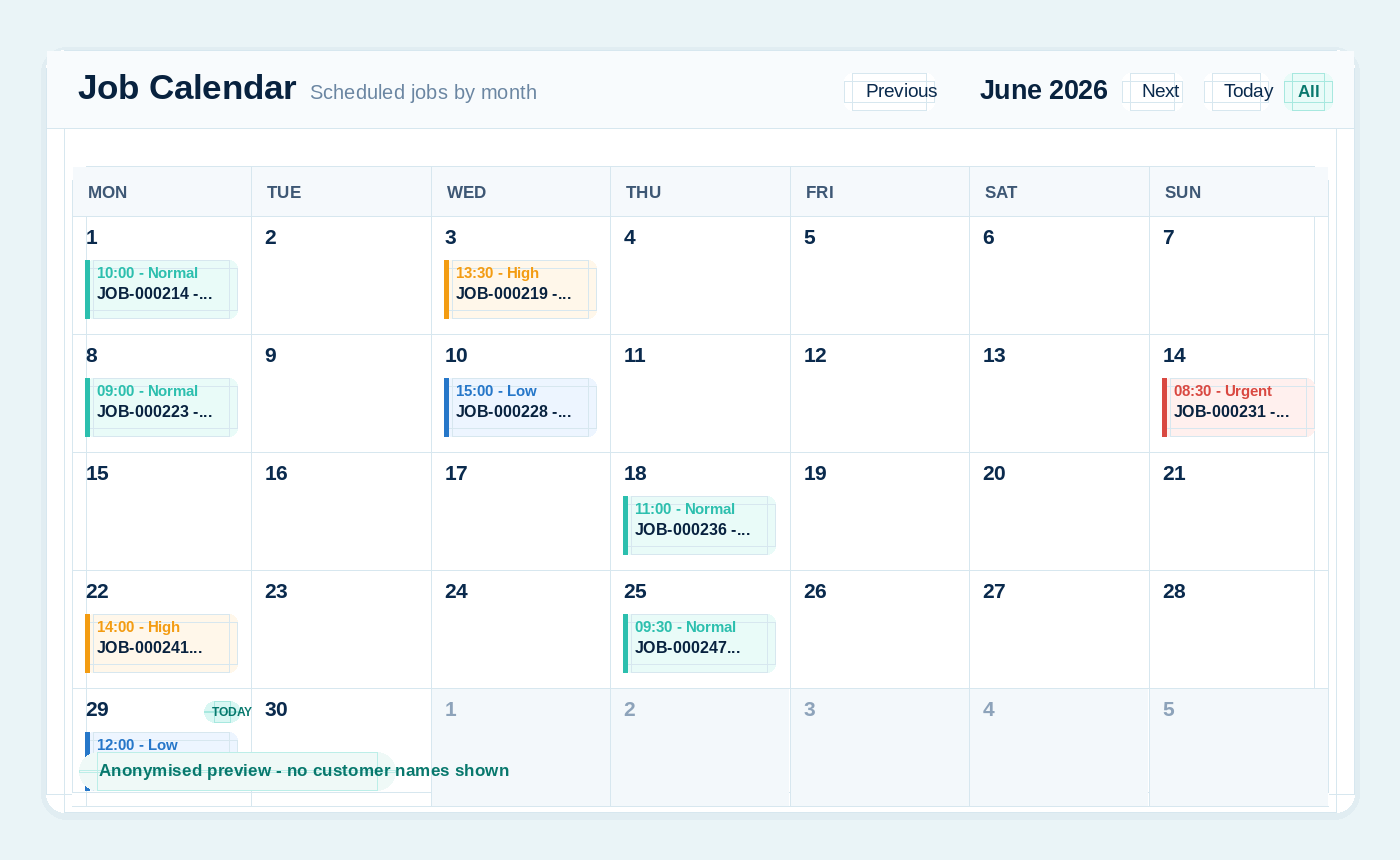
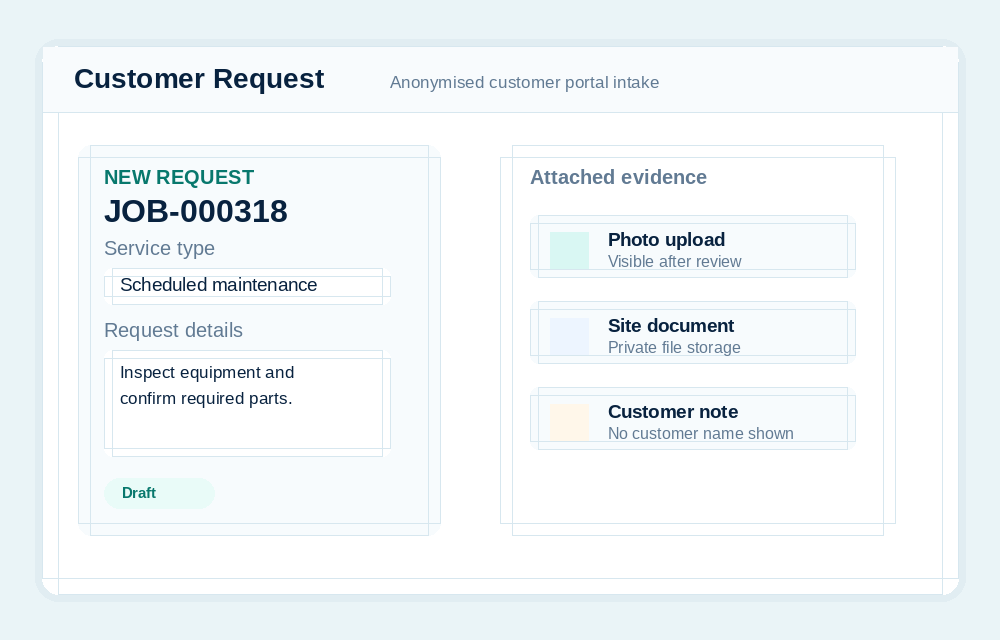
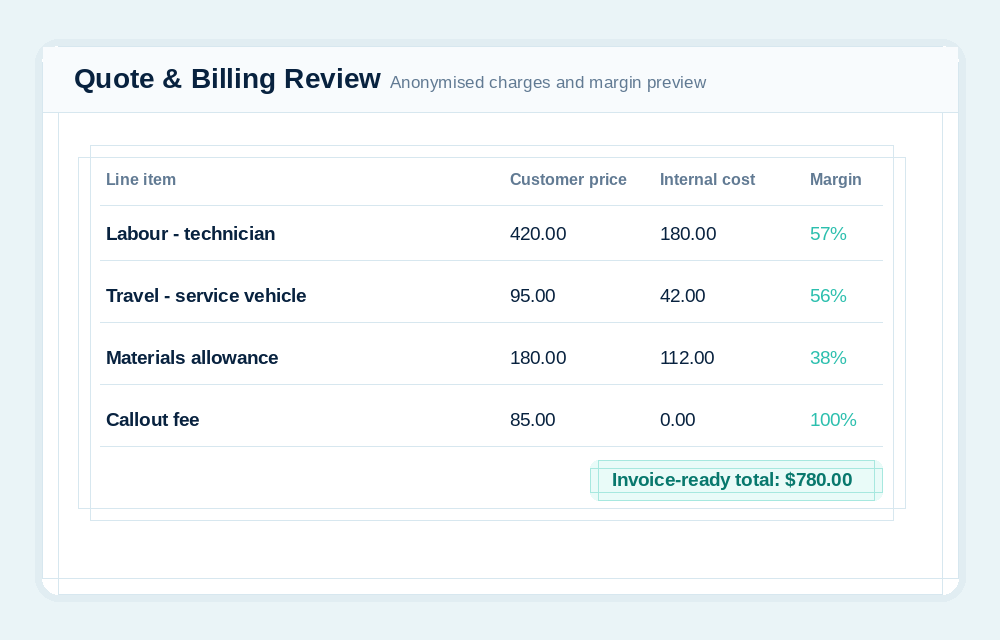
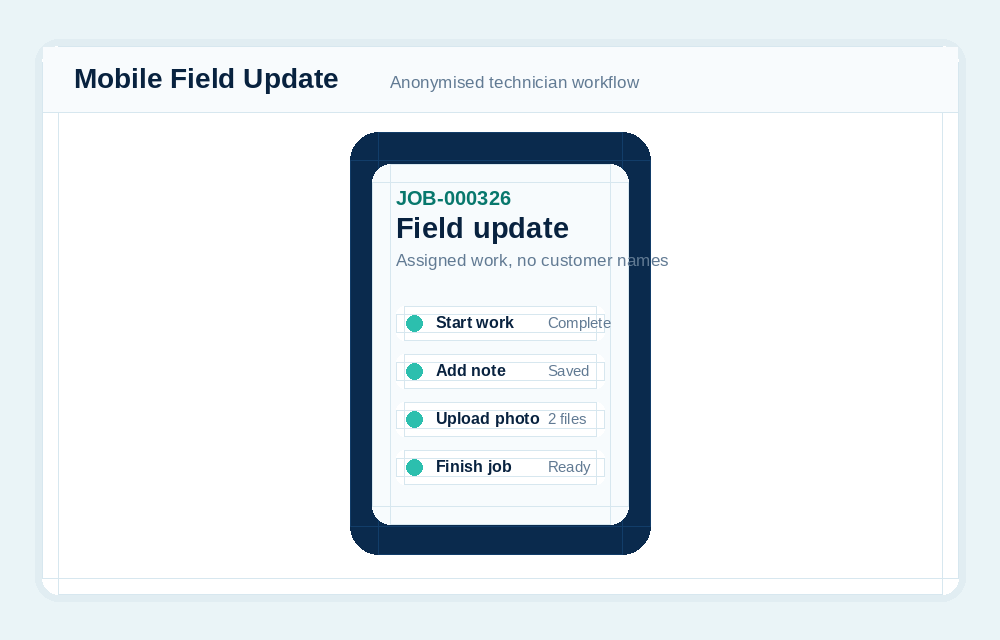
These previews use generic job numbers, task labels, and anonymised data only. They show the shape of the workflows without exposing customer names, staff names, addresses, pricing from a real account, or private files.
Workflow
How a job moves through SharpFleet
Each step adds context to the same record, so the job does not fragment across email, spreadsheets, accounting notes, and field photos.
1
Request
Create manually, use AI assist, receive from the customer portal, or import from email.
2
Review
Check draft jobs, customer, site, urgency, notes, photos, documents, and AI warnings.
3
Quote
Prepare, send, revise, accept, and convert quotes into jobs when approval is complete.
4
Schedule
Choose an open day and time from the full calendar, then assign available technicians and vehicles.
5
Work
Follow a general, field service, workshop, or production template and assign each task in-house or to a subcontractor.
6
Approve
Capture required specifications, artwork or proof approval, task evidence, and customer-visible updates where needed.
7
Complete
Record completed work, time, notes, photos, documents, travel, customer notification, and an optional survey.
8
Bill
Review quoted or actual charges, tax, linked travel, price, total, internal cost, margin, and profit.
9
Invoice
Send to Xero or QuickBooks, or export CSV and mark the job invoiced when handled externally.
Configure the work around the business, not one hard-coded industry
Reusable templates can support IT support, trades, field service, fabrication, printing, installation, maintenance, or other multi-stage work. Each job keeps the task sequence and evidence attached to the same record.
- Create templates for general, remote, field service, workshop, or production jobs.
- Define ordered tasks, required specification fields, checklists, customer review wording, and enabled modules.
- Move custom tasks before work starts; active and completed tasks remain fixed to protect the history.
- Assign a whole job or individual task to an internal user or subcontractor.
- Track task start, pause, progress, evidence, completion, and audit activity.
Keep customer approval connected to the work it releases
Artwork and proof versions use secure cloud storage and branded token links so customers can approve or request changes without seeing internal costing or other records.
- Upload artwork or design versions and open review-ready previews on phone, tablet, or desktop.
- Record approval or change requests in the job timeline and audit trail.
- Show subscriber notifications in the bell and dashboard banner when a customer responds.
- Use completion wording suited to pickup, installation, completed work, or another customer update.
Send a controlled work order and see the progress come back
Subcontractors do not need a full internal account. A secure work-order link gives them the actions and files needed for their assigned job or task.
- Assign the complete job or one task, such as installation, fabrication, design, or specialist field work.
- Let the subcontractor accept, start, update, upload photos or files, and complete the work order.
- Notify the subscriber when work is accepted, started, or completed and keep progress visible from the job.
- Carry the agreed subcontractor amount into billing review as internal cost while the subscriber controls the customer-facing price.
A job record from request through completion
SharpFleet Job Management keeps the operational record in one place: customer, site, branch, technician, vehicle, schedule, urgency, status, notes, attachments, job activity, linked travel, labour, materials, and accounting readiness.
- Create jobs from the admin portal or from the mobile/PWA workflow.
- Create AI-assisted draft jobs from plain language, pasted email text, or screenshot/snip content.
- Receive customer-submitted requests, AI-assisted requests, and inbound email requests as draft jobs for human review.
- Track statuses such as received, draft, unassigned, booked, in progress, completed, and cancelled.
- Completed jobs can be marked invoiced, after which the operational and billing record becomes read-only.
- Keep a combined job timeline that can include quote activity, customer portal updates, scheduling, start, completion, and conversion history.
- Add optional purchase order numbers to job records and accepted quotes.
Let customers log jobs without seeing internal SharpFleet records
The customer portal is designed for a customer of the subscriber. They can see their own jobs, sites, status updates, schedules, messages, and attachments, while staying scoped away from other customers, fleet records, accounting, internal notes, and costing.
- Invite customer portal users by email and scope them to their customer record.
- Customers can submit new job requests, choose a site, set urgency, add request details, and upload photos or documents.
- Customers can create AI-assisted draft requests from natural language or pasted/screenshot email content.
- Customers can request quotes directly from the portal and review quotes without seeing internal costing.
- Customers can accept quotes with confirmation checkboxes, optional PO number, acceptance note, IP address, user agent, accepted total, and accepted version recorded.
- Customers can request quote changes; SharpFleet keeps the same quote number and manages quote versions.
- Customer requests arrive for the subscriber as draft jobs so the team can review, schedule, assign, and control the work.
- Portal branding can use the subscriber logo and colours so customers know they are in the right place.
- Customer portal users can enable two-factor authentication, and subscribers can enforce 2FA where needed.
- Customer portal notifications include a bell menu with clear notifications support.
Quote, revise, accept, and convert without losing the job context
SharpFleet Quotes adds an approval layer before work becomes a job. Teams can prepare a quote, send it to the customer portal, capture acceptance details, keep version history, and convert accepted quotes into jobs with billing charges carried through.
- Create quote requests from the admin portal or customer portal.
- Prepare quotes with labour, travel, materials, parts, contingency, configurable tax, estimated cost, customer notes, internal notes, and validity dates.
- Default quote validity can be configured in Jobs Settings and overridden per quote.
- Labour quote lines can use costing roles and default charge-out rates.
- Travel quote lines can calculate distance and drive time from branch/base to customer site, while still allowing manual override.
- Quote versions stay under the same quote number when a customer requests changes.
- Quote PDFs can be downloaded and included with quote emails.
- Quote audit and timeline records show sent, opened, review requested, accepted, declined, converted, and email events.
- Configure two quote follow-ups and a final reminder, with audit entries and a no-response notification to the subscriber.
Turn messy emails into controlled draft jobs
SharpFleet can help teams capture work requests that arrive by email without letting automation create live jobs unchecked. AI creates a draft and the team remains in control.
- AI Assist converts plain user language into a draft job suggestion for review.
- Screenshot/snip paste support lets users paste an email screenshot without saving and browsing for a file first.
- Inbound Mailgun routes can receive forwarded job request emails and create draft jobs only.
- Inbound email routing can use tenant-specific addresses such as jobs+token@mg.sharpfleet.com.au.
- Sender matching uses safer customer email/domain rules so uncertain requests stay in review instead of being forced to a customer.
- Email attachments can be attached to the draft job with size/type limits.
- Acknowledgement emails can be sent to the sender, and subscriber notification emails can alert the configured portal notification address.
Technicians can update jobs from the field
The mobile experience supports technicians and drivers who need to work on assigned jobs from a phone. They can open the job, review the work, add updates, upload evidence, and complete the job without needing the full admin portal.
- Assigned users can see and work on jobs allocated to them.
- Technicians can record completed work and time, add photos, documents, and job notes from mobile.
- Customer-facing updates and internal operational records can be kept separate.
- A full-month scheduling calendar shows existing work, urgency colours, crowded-day previews, and open days before a time is selected.
- Availability checks filter technicians and vehicles for the selected branch and time; vehicles are optional for remote and other no-travel work.
- Offline support remains available for already-loaded mobile work where the current PWA workflow supports it.
Understand the real cost of the job, not just the invoice value
A job can look profitable if only the customer invoice is considered. SharpFleet Job Management is designed to include the work behind the work: labour, travel time, vehicle travel cost, material cost, and other internal cost assumptions.
- Use business costing rates instead of exposing real wage rates in line items.
- Cost labour by role and team size, including more than one person on a job.
- Use separate internal cost rates and customer charge-out rates for costing roles.
- Include travel as an internal cost even when the customer is not billed for travel.
- Accepted quote charges flow into Billing automatically, with extra or changed charges added only when the completed work differs from the quote.
- Jobs created without a quote can build billing charges from actual completed work and technician time.
- Track material sale value separately from internal material cost so margin is more realistic.
Photos and documents stay connected to the customer, job, and quote
Files are not just attachments. SharpFleet keeps uploaded files linked to the operational record, with private storage, controlled access, previews, downloads, and customer-specific library views.
- SharpFleet cloud storage keeps uploaded job, quote, proof, and work-order files private by default.
- Images open in a SharpFleet modal instead of forcing a new browser tab.
- PDFs can be previewed in the file modal, with downloads for files that cannot be previewed safely.
- Admin users can open a customer library to see all customer images and documents linked to jobs and quotes.
- Customer portal users can open their own library and only see files visible to their account.
- Review-friendly image derivatives reduce the size needed for customer viewing while preserving the source record.
Turn job activity into useful operational reporting
Jobs reports help teams review customer workload, completed jobs, billable and non-billable work, cost, profit, margin, labour time, travel time, linked trips, and distance.
- Job costing summary reports can be filtered by customer and date range.
- Job costing detail pages show line item costing, linked travel, revenue, cost, profit, margin, and cost basis.
- Job timelines can show the full quote-to-job lifecycle in admin and customer portal views.
- PDF exports can be used for review, internal records, or management reporting.
- Retainer and record-only jobs can still be tracked even when the customer is not billed for each item.
Review Billing, then hand the invoice to the right accounting workflow
SharpFleet keeps the operational record and billing review together without trying to replace the accounting ledger. Teams can confirm charges and tax, then send or export the invoice through their configured workflow.
- Billing shows price, the configured tax label and rate, tax amount, and total for each included charge.
- Tax terminology and default rate are configurable for GST, VAT, sales tax, or another regional tax name.
- Quoted travel remains a single quoted charge; unquoted linked travel can be billed by distance or labour time according to Jobs Settings.
- Connect Xero and create an invoice, with final Xero invoice states automatically marking the job invoiced.
- Connect QuickBooks and create an invoice, with sent or paid invoices automatically marking the job invoiced.
- Generic CSV workflows can be marked invoiced manually after the exported invoice is handled externally.
- Use account codes, references, inclusion rules, per-line tax rates, and invoice-ready totals.
- Invoiced jobs are locked against further operational and billing edits, preserving the record that was invoiced.
- Internal costing rates and report assumptions are not pushed as customer invoice charges unless deliberately billed.
Who Can Use It
The right access for each person involved in the job
Jobs can involve internal admin users, field technicians, and customer contacts. The important part is that each person sees what they need, not everything the business knows.
Full company access, including jobs, users, settings, reports, accounting exports, and customer portal setup.
Focused job control: create, edit, assign, schedule, report, push to accounting, and receive job notifications.
Works on assigned jobs, adds updates, uploads evidence, and completes work without deleting jobs or pushing to accounting.
Customer-side access to their own jobs, sites, schedules, statuses, messages, and uploaded files only.
Common Uses
Where Jobs fits naturally
SharpFleet Job Management works best where field work, customer visibility, vehicle movement, and internal cost awareness need to live together.
Maintenance contractors managing work for multiple business customers.
Field service teams that need scheduling, job evidence, and customer visibility.
Fleet operators who want vehicle travel and job work connected.
IT, electrical, plumbing, building, facilities, and site service teams.
Design, print, fabrication, workshop, installation, and other production teams.
Businesses that assign complete jobs or specialist tasks to subcontractors.
Businesses on retainers where work still needs to be recorded even when each job is not invoiced.
Teams that need job cost visibility without exposing confidential wage information.
Jobs Guides
More detail on specific Jobs workflows
These pages explain the Jobs module from the point of view of quotes, configurable production workflows, scheduling, customer approvals, subcontractors, costing, billing, trades, and maintenance teams.
Job Management Software
Job management software for teams that need requests, scheduling, field updates, photos, customer records, billing review, and reporting in one connected workflow.
Job Quote Software
Job quote software for creating quote versions, customer approvals, accepted quote records, quote-to-job conversion, PDFs, labour, travel, materials and billing preparation.
Customer Portal Job Management
Customer portal job management for customer job requests, quote approvals, status updates, schedules, files, messages and customer-scoped job visibility.
Field Service Job Scheduling
Field service job scheduling software with calendar planning, technician assignment, vehicle assignment, branch availability, urgent jobs and mobile job updates.
Job Costing Software
Job costing software for reviewing labour, travel, vehicle cost, materials, charge-out rates, quoted work, actual work, profit and margin across jobs.
Job Billing and Invoicing
Job billing and invoicing workflow for reviewing charges, tax, totals, quoted lines, actual work, Xero, QuickBooks, CSV export and invoiced job locking.
Tradie Job Management Software
Tradie job management software for quotes, scheduling, customer requests, field photos, receipts, completed work, billing review and job reporting.
Production Job Workflow Software
Production job workflow software with configurable templates, required specifications, artwork and proof approvals, subcontractor work orders, task evidence, customer updates and billing review.
Maintenance Job Management Software
Maintenance job management software for service requests, quotes, scheduling, customer updates, technician work, photos, documents, billing and reporting.
Practical View
Jobs is not just for invoiced work.
Some work is billable. Some work is covered by a retainer. Some work is recorded for compliance, customer service, or internal time tracking. SharpFleet Job Management is built to keep those records useful without forcing every job to become an invoice.
SharpFleet Assistant